The article discusses the experience of Kacey Smith, a supporter of Vice President Kamala Harris, as she navigated TikTok in the lead-up to the US presidential election. Initially optimistic about Harris' chances against Donald Trump, Smith began to notice troubling messages in her TikTok feed that seemed to oversimplify complex issues, such as framing women's rights as opposed to economic concerns.
For many teams, project management is a constant juggle: tracking deadlines, keeping people aligned, writing endless updates, and managing tools that often create more noise than clarity.
But over the past year, something interesting has happened — project managers have quietly started plugging ChatGPT into their workflows, and the results have been surprisingly effective.
Here’s how it’s happening — and how you can apply it, whether you’re managing a 3-person team or a multi-department project.
✅ 1. Writing Project Briefs and Kickoff Notes Faster Starting a new project often means writing the same types of docs: summaries, objectives, stakeholder notes, timelines.
With the right prompt, ChatGPT can:
Turn bullet points into structured kickoff briefs
Help draft stakeholder updates that sound polished
Create outlines for proposals or scopes of work
🔍 Prompt example: “Turn these bullet points into a professional project kickoff brief, formatted with sections: Objectives, Timeline, Stakeholders, Deliverables…”
✅ 2. Simplifying Meeting Notes and Action Items Let’s be honest: no one loves taking notes. But ChatGPT can summarize raw transcripts or messy Zoom notes into clean, useful recaps.
Teams are using it to:
Convert rough meeting notes into follow-up emails
Generate action items by role
Clarify unclear parts of the conversation
🧠 Pro tip: Paste in your notes and ask: “Can you summarize this into bullet points with clear action items and owner names?”
✅ 3. Creating Clearer Status Reports Instead of manually writing weekly updates, many PMs now:
Draft reports in Notion or Google Docs
Ask ChatGPT to clean up and structure the language
Customize the tone depending on the audience (technical vs executive)
This keeps stakeholders informed while saving time and reducing friction.
✅ 4. Drafting Jira Tickets and Task Descriptions For teams that use Jira, Asana, or Trello — GPT can speed up how you create tickets.
Give it a task name and rough idea, and ask:
“Write a Jira task description for a dev, including acceptance criteria and background context…”
You’ll still want to tweak for clarity, but it cuts writing time down dramatically.
✅ 5. Planning Sprints and Project Timelines Project planning usually starts with rough dates and milestones. ChatGPT can help structure them:
Build initial sprint timelines
Suggest dependencies you may have overlooked
Format plans into readable timelines for your team or client
🎯 Example prompt: “Build a 4-week sprint plan for launching a product feature, including weekly goals and team responsibilities.”
✅ 6. Managing Team Communication with Less Noise ChatGPT can help you phrase tricky updates, pushback, or gentle reminders more professionally — or more casually, depending on the situation.
This is especially useful when juggling multiple teams or when you need to push back without sounding negative.
🧩 Final Thoughts ChatGPT isn’t replacing project managers — but it’s quietly becoming one of the most valuable tools in a PM’s toolkit.
When used right, it:
Cuts writing time
Clarifies messy communication
Saves cognitive load on repetitive tasks
And it does all of this without needing to add another app to your stack.
If you’re managing projects, chances are you’re already doing 90% of the work manually. Why not let ChatGPT help with the rest?
For small and mid-sized businesses (SMBs), every dollar — and every hour — counts.
While ChatGPT often gets attention for creative tasks and personal use, forward-thinking SMBs are quietly using it to automate repetitive work, improve customer interactions, and even cut operational costs.
Here’s how.
🔹 1. Automating Customer Support FAQs
Many SMBs don’t have dedicated support teams. Answering the same 10–15 customer questions becomes a huge time drain.
Instead of hiring additional staff, businesses are:
Using ChatGPT to draft instant FAQ responses for website chatbots
Auto-generating email replies for common inquiries (returns, scheduling, pricing)
Example: A boutique fitness studio built a simple chatbot script with ChatGPT handling member FAQs like schedule changes, billing, and class info — saving the owner 10+ hours/month.
🔹 2. Streamlining Internal Documentation & SOPs
Most SMBs have outdated onboarding docs or “tribal knowledge” scattered across emails and chat logs.
ChatGPT is helping by:
Turning messy SOP drafts into clean, step-by-step guides
Summarizing Slack threads or meeting notes into actionable bullet points
Creating onboarding checklists for new hires
Real use case: A regional marketing agency used ChatGPT to clean up their internal process documents, making it easier to train new account managers — reducing onboarding time by 30%.
🔹 3. Drafting Sales & Outreach Emails Faster
Cold outreach can be tedious. Many SMBs are leveraging ChatGPT to:
Draft personalized first-touch emails
Generate follow-up templates
Reframe case studies into outreach snippets
Example: An IT services company used ChatGPT to create templated outreach emails tailored to different verticals (healthcare, finance, manufacturing), cutting content creation time from days to hours.
SMBs with limited marketing resources are using ChatGPT to:
Brainstorm blog outlines
Rephrase technical content for non-expert audiences
Suggest headlines, meta descriptions, and SEO-friendly titles
Importantly, they treat ChatGPT as a content assistant, not a full writer — human editing ensures quality and authenticity.
🔹 5. Accelerating Research & Data Summarization
Small teams often lack time to sift through dense reports or technical papers.
ChatGPT is being used to:
Summarize long articles or reports into digestible insights
Extract key stats for presentations
Translate complex industry jargon into plain English for clients
Example: A logistics company used ChatGPT to summarize industry whitepapers into client-friendly briefs, helping their sales team sound informed without spending hours reading.
✅ Final Thoughts: Efficiency Wins Over Hype
For SMBs, ChatGPT isn’t about chasing AI trends — it’s a practical tool for saving time and optimizing workflows.
The key is knowing where it fits into your daily operations, and combining AI support with human judgment.
As more businesses adopt AI tools, those who integrate them effectively (even in small ways) will pull ahead in efficiency and agility.
Reviewed 2026-07-23 — some details in this piece may have changed since original publication.
ChatGPT is quickly becoming one of the most practical tools used by modern businesses to streamline repetitive tasks, simplify communication, and supercharge documentation. Whether you’re part of a small startup or a mid-size IT team, integrating ChatGPT into your workflows can mean faster output, fewer bottlenecks, and more time spent on work that actually matters.
Here are 5 real ways companies are putting ChatGPT to work – right now.
1. Turning Long Docs Into Clean SOPs and Checklists
Most teams are sitting on a graveyard of outdated documentation — PDFs, email threads, and internal wikis that are rarely referenced or hard to follow.
Instead of rewriting everything manually, smart teams are pasting these docs into ChatGPT and asking it to:
Rewrite the content into step-by-step checklists
Summarize key instructions by role or department
Reformat dense blocks into action items for onboarding or client delivery
For example, an onboarding guide for new IT staff that was previously 17 pages long became a clean, 1-page checklist – ready to use in under 5 minutes.
This use case alone saves hours for HR, operations, and client-facing roles – and it ensures everyone is working from the same streamlined process.
Team communication is often spread across Slack threads, meeting notes, and scattered Notion pages. The result? Lost context, missed next steps, and duplicated effort.
Now, teams are copying transcripts or chat logs into ChatGPT and asking:
“Can you summarize the key decisions made here?”
“What were the next steps and who owns them?”
“Draft a follow-up message for the team with what was discussed.”
The result is a clean, clear summary that can be shared within minutes – without anyone having to rewatch recordings or dig through messages.
It’s like having a real-time executive assistant keeping track of who said what – and what needs to happen next.
3. Writing First-Draft Emails, Proposals, and Follow-Ups
Starting from scratch is one of the biggest time sucks for sales, support, and operations teams.
ChatGPT is being used to:
Write polite but firm follow-up emails
Draft cold outreach with specific product benefits
Turn bullet-point notes into full client proposals or renewal plans
Summarize meeting notes into a recap email for stakeholders
The key isn’t to let AI speak for you – it’s to let it do the grunt work. You edit and personalize the final 20-30%, but GPT gets you out of “blank page” mode almost instantly.
One sales team we saw went from writing 4-5 emails per hour to prepping 12–15 in the same time, just by using prompt templates for common responses.
4. Simplifying Technical Docs (Especially for Azure + Microsoft Fabric)
This one is underutilized – and incredibly effective.
Teams dealing with Microsoft Azure, Fabric, and 365 setups are using ChatGPT to:
Break down complex documentation into understandable pieces
Explain Azure components (e.g., Service Bus vs. Event Hub) in plain English
Generate internal documentation faster for cloud infrastructure setups
Translate Fabric pipeline logic for stakeholders who aren’t data engineers
For example, an IT lead used ChatGPT to convert Microsoft Fabric documentation into a client-ready training doc for their internal finance team. What would’ve taken 3 hours was finished in 20 minutes.
Even experienced engineers are using GPT to “speed-read” technical material or summarize Microsoft whitepapers to share with colleagues.
5. Building Prompt Templates for Repeatable Tasks
The most efficient teams aren’t just using ChatGPT ad hoc – they’re building prompt libraries to standardize usage across roles.
These are shared documents with plug-and-play prompts like:
“Write a follow-up email summarizing this meeting transcript…”
“Turn this list of product features into a marketing landing page outline…”
“Summarize this code and write test cases in plain English…”
By creating standardized, high-performing prompts, teams reduce training time, avoid repetitive writing, and get consistent outputs across departments – from support to engineering to marketing.
Over time, these prompt libraries become part of onboarding, internal SOPs, and even client delivery processes.
Final Thoughts
ChatGPT is no longer just a novelty tool for solo productivity. Businesses are quietly embedding it into internal workflows, documentation, client communication, and even infrastructure planning.
The common thread across all of these use cases? It’s not about replacing people – it’s about replacing wasted time.
If your team isn’t yet taking advantage of GPT-powered workflows, the best time to start was yesterday. The second best time is now.
The artificial intelligence (AI) industry in the U.S. experienced an impressive growth trajectory in 2024, and the momentum doesn’t appear to be slowing down in 2025. Last year, a total of 49 AI startups managed to secure funding of $100 million or more, according to data from TechCrunch[1]. In fact, three of these companies managed to secure multiple rounds of “megafunding”, and seven startups attracted investments of a billion dollars or more.
The question now is, how does the landscape look for 2025?
As an emerging technology, AI continues to draw significant interest from venture capitalists and investors. The year 2025 has already seen 19 U.S. AI startups that have successfully raised $100 million or more in investment funding. This continuing trend of heavy investment in AI startups demonstrates the confidence that investors have in the potential of this technology.
The AI industry’s significant growth and the sizeable funding rounds attracted by these startups are indicative of the increasing recognition of the transformative potential of AI technology. It’s not just about automation and efficiency, but about how AI can redefine business models, create new services, and drive social impact.
Looking ahead, the high level of funding activity in the AI industry is expected to continue, as more startups emerge, and existing ones continue to innovate and expand. This will undoubtedly contribute to the dynamic evolution of the U.S. AI industry in 2025 and beyond.
References:
[1] “Here are the 49 AI startups that raised $100M or more in 2024,” TechCrunch, 2024.
By 2025, Natural Language Processing (NLP) is reshaping how machines understand and interact with human language. From real-time translation to smarter virtual assistants, NLP has transformed industries like healthcare, education, and customer service. Here’s a quick overview of what you need to know:
Key Advancements: Real-time global translation, advanced sentiment analysis, and AI tools with human-like content creation.
Core Techniques: Tokenization, part-of-speech tagging, named entity recognition, and transformer models like GPT-4.5 and Grok 3.
Industry Impact: NLP powers medical diagnoses, personalized education, and customer service automation.
Future Trends: Efficiency improvements, multimodal AI, and privacy-focused tools like Apple’s Siri 2.0.
NLP is now a $35 billion market, with tools like GPT-4.5 and Gemini 2.0 leading the charge. Whether you’re a developer, researcher, or business leader, NLP is revolutionizing how we communicate with machines.
NLP Technical Fundamentals
Main NLP Components
Natural Language Processing (NLP) relies on a set of core techniques to break down and understand human language.
Tokenization: This process divides text into smaller pieces called tokens, such as words, subwords, or characters. For instance, the sentence "I love NLP!" becomes: ["I", "love", "NLP", "!"].
Part-of-Speech (POS) Tagging: POS tagging assigns grammatical roles (like noun, verb, or adjective) to tokens, helping clarify the structure of a sentence.
Named Entity Recognition (NER): NER identifies and categorizes specific entities in text, such as names of people, organizations, or locations.
Stemming and Lemmatization: These techniques reduce words to their base forms. Stemming applies rules to strip suffixes, while lemmatization uses context and dictionaries for more precise results, though it requires more computational resources.
Text Processing Methods
Before analysis, raw text needs to be converted into numerical formats that algorithms can understand.
Bag of Words (BoW): This method counts word occurrences in a document.
TF-IDF: By weighting words based on how rare or common they are, TF-IDF highlights terms that carry more meaning.
N-grams: These group sequences of N tokens (e.g., "natural language") to capture patterns and context within text.
Transformer Models
Transformer models have changed the game in NLP by processing entire input sequences at once instead of one token at a time. Key features include:
Self-Attention: This mechanism evaluates the importance of each token in relation to others within the sequence.
Positional Encoding: Ensures that word order is preserved, even when processing sequences in parallel.
Encoder–Decoder Structure: Helps understand input data and generate meaningful output.
These foundational concepts pave the way for the advanced tools and models explored in the following sections.
Stanford CS25: V2 I Introduction to Transformers w/ Andrej …
NLP Tools and Systems
With the mechanics of transformers in mind, let’s dive into the latest models and tools shaping today’s NLP applications.
The year 2025 brings a new wave of NLP models and development platforms, all building on the foundation of transformer technology.
2025 NLP Models
Here are some standout AI models optimized for various applications:
GPT-4.5: A versatile system designed for voice, canvas, search, and Deep Research, offering enhanced accuracy and deeper conversational abilities.
Grok 3: Features real-time data capabilities via X, a "Big Brain Mode" for handling complex tasks, and a massive 1-million-token context window.
Gemini 2.0: A multimodal LAM architecture that supports native image and audio output, with seamless integration into Google’s ecosystem.
NLP Development Tools
These tools are tailored for different development needs:
DeepSeek R1: An open-source option that’s budget-friendly and excels in coding and math, making it ideal for startups and technical documentation.
Qwen 2.5-Max: A multimodal platform supporting text, image, audio, and video with an extended context window, suited for enterprise multimedia projects.
Claude 3.7: A model focused on ethical AI, specifically designed for compliance-heavy environments and regulated industries.
Tool Comparison Guide
When choosing the right tool, consider the following criteria:
Performance: Includes reasoning capabilities, context length, and supported modalities (e.g., GPT-4.5 excels in reasoning, while DeepSeek R1 is great for coding and math).
Integration: How well the tool fits into your existing ecosystem (e.g., Gemini 2.0 integrates seamlessly with Google, while Grok 3 connects to live web data).
Cost of Ownership: Includes licensing, hosting, and scalability (e.g., DeepSeek R1 offers the most budget-friendly option).
These factors help align the right technology with your business goals. For instance, the benefits of NLP applications are clear: chatbots can increase lead conversions by 67%, meet 70% of customer resolution expectations, and personalization efforts can boost customer satisfaction by 20% while increasing revenue by 10-15%.
sbb-itb-af3bf96
NLP in Different Industries
Let’s take a look at how NLP is transforming various sectors.
Customer Service Systems
NLP helps customer service systems understand user intent and emotions, automate replies, direct issues to the right teams, shorten wait times, and offer personalized support on a larger scale.
Medical Applications
In healthcare, NLP is used to analyze clinical notes, electronic health records (EHRs), and medical research. This helps in making clinical decisions, simplifying documentation, identifying high-risk patients, and reducing administrative work.
Education Tools
Educational tools leverage NLP to review student writing, provide instant feedback, customize learning materials, and enable interactive language learning with features like pronunciation practice and real-time translation.
These examples highlight how NLP is making a difference across industries, with more advancements likely on the horizon.
NLP Future Developments
NLP is evolving rapidly, with progress in three main areas: emerging trends, technical advancements, and educational resources. These developments are set to further shape industries like customer service, healthcare, and education.
New NLP Trends
Meta’s LLaMA 3 and 4 introduce features like multimodal moderation and sentiment analysis, enhancing platforms such as Facebook, Instagram, and WhatsApp. Meanwhile, Apple’s on-device Intelligence powers Siri 2.0, delivering advanced conversational AI with a focus on privacy.
Technical Improvements
NLP technology is advancing in several key areas:
Efficiency: Sparse transformers and edge AI reduce computing demands and energy consumption.
Memory: Tools like RAG 2.0 and persistent memory improve the ability to handle longer contexts.
Processing: Multimodal integration brings together text, images, video, and audio seamlessly.
Reasoning: AI is now tackling more complex tasks, including mathematical, causal, and logical reasoning.
For instance, Tesla leverages large language models (LLMs) through its Dojo platform for real-time driving simulations. Similarly, Google’s Gemini enhances enterprise search capabilities and supports scientific research.
Learning Materials
Accessible learning resources are key to expanding NLP’s reach:
Interactive platforms: Tools like Azure AI and Google Workspace provide LLM-as-a-service and integrated AI functionalities.
Documentation: Meta’s LLaMA research papers and Apple’s privacy-focused AI guides offer valuable insights.
Open source: Community-driven projects allow for practical experimentation and collaboration.
These resources are helping developers, researchers, and enthusiasts stay at the forefront of NLP advancements.
Summary
The NLP market has surpassed $35 billion, with 78% of enterprises placing AI as a top priority. By advancing tools like real-time translation and sentiment analysis, NLP is driving notable progress across various industries:
Customer Service: Chatbots improve conversion rates, resolution times, customer satisfaction, and revenue, all by double-digit percentages.
Healthcare: NLP aids mental health support and provides emotional guidance.
Education: Adaptive tutors have increased course completion rates by as much as 30%.
Future developments include integrations with brain-computer interfaces and decentralized AI, introducing fresh possibilities. At the same time, stricter ethics and bias controls are shaping responsible innovation, positioning NLP as a cornerstone of human-machine interaction beyond 2025.
In the dynamic world of artificial intelligence (AI), advancements are being made every day. One such development, which we will explore in this guide, involves utilizing the power of a browser-driven AI entirely within Google Colab. This methodology employs a combination of Playwright’s headless Chromium engine, the browser_use library’s Agent and BrowserContext, LangChain, and Google’s Gemini model.
Playwright, a robust automation library, offers a headless Chromium engine that allows us to program websites and extract valuable data seamlessly. The browser_use library provides high-level Agent and BrowserContext abstractions, which further facilitate the automation of complex workflows.
Harnessing the power of these tools in Google Colab, a widely-used cloud-based coding platform, offers a new frontier in AI implementation. The power of Google’s Gemini model is also leveraged, enhancing the capabilities of browser-driven AI.
This guide aims to provide you with a comprehensive understanding and practical knowledge of the application of these tools in Google Colab. As we delve into the intricacies of browser-driven AI, you’ll learn how to automate tasks, navigate websites programmatically, and extract useful data.
In conclusion, mastering browser-driven AI in Google Colab using Playwright, browser_use Agent & BrowserContext, LangChain, and Gemini, is an advanced coding implementation that’s bringing a revolution in the AI landscape.
Stay tuned to our platform for more informative and engaging content on AI and related technologies.
References:
1. “An Advanced Coding Implementation: Mastering Browser‑Driven AI in Google Colab with Playwright, browser_use Agent & BrowserContext, LangChain, and Gemini”. MarkTechPost. Retrieved from https://www.marktechpost.com/2025/04/20/an-advanced-coding-implementation-mastering-browser%e2%80%91driven-ai-in-google-colab-with-playwright-browser_use-agent-browsercontext-langchain-and-gemini/
2. “Playwright Documentation”. Microsoft. Retrieved from https://playwright.dev/
3. “Google Colab”. Google. Retrieved from https://colab.research.google.com
4. “Gemini Model”. Google AI. Retrieved from https://ai.google/research/teams/brain/gemini/
Content: Amidst a storm of critique, an executive from Palantir, the renowned data analytics firm, has stepped forward to staunchly defend the company’s role in immigration surveillance. The criticism was instigated by a co-founder of the notable startup accelerator, Y Combinator, who did not hold back in his disapproval of Palantir’s operations.
This debate emerged in the wake of federal filings revealing that the U.S. Immigration and Customs Enforcement (ICE)—responsible for implementing the immigration policies of the Trump administration—had been utilizing the services of Palantir.
Palantir’s executive promptly responded to the critique, providing a comprehensive justification of the firm’s involvement in immigration monitoring. He emphasized the importance of the company’s work, highlighting its significant contribution to the enforcement of immigration laws and regulations.
The exchange between the Y Combinator co-founder and the Palantir executive underscores the ongoing debate surrounding data analytics firms and their role in government operations. With the increasing reliance on data analytics in various sectors, including immigration enforcement, the ethical implications of such partnerships are being scrutinized more than ever before.
As a leading player in the data analytics industry, Palantir’s stance in this debate will likely have far-reaching implications. The company’s defense of its actions signals its commitment to its role in the industry, even amidst the ongoing controversy.
References:
1. U.S. Immigration and Customs Enforcement (ICE) – www.ice.gov
2. Palantir Technologies – www.palantir.com
3. Y Combinator – www.ycombinator.com
Content: Nintendo has made an exciting announcement that will leave gaming enthusiasts smiling. Despite the anticipated delay and possible price hike due to the Trump administration’s hefty tariffs, the company confirmed that the pre-orders for the much-awaited Nintendo Switch 2 in the U.S. will commence on April 24 and it will retain its price at a steady $449.99.
This news comes as a sigh of relief for fans who were worried about a potential increase in the console’s price due to Trump’s stringent export rules on international goods. However, Nintendo has assured its loyal customer base that the price for the Switch 2 will remain unchanged.
Nintendo’s announcement on Friday has cleared the air of uncertainty surrounding the pricing of the new console amid the tariff situation. This move showcases the company’s commitment to providing its customers with high-quality gaming experiences at stable prices, even in a fluctuating economic environment.
For those uninitiated, the Nintendo Switch 2 is the latest addition to the company’s line of innovative gaming consoles, known for their hybrid capabilities and unique gameplay experiences. The confirmation of the console’s price tag will likely boost its demand among gaming enthusiasts who are eagerly awaiting its release.
Stay tuned for more updates regarding the Nintendo Switch 2’s pre-order and release schedule.
References:
– Nintendo Official Site (https://www.nintendo.com/)
– Tariffs, Trump, and Trade Policies (https://www.brookings.edu/research/tariffs-trump-and-trade-wars/)
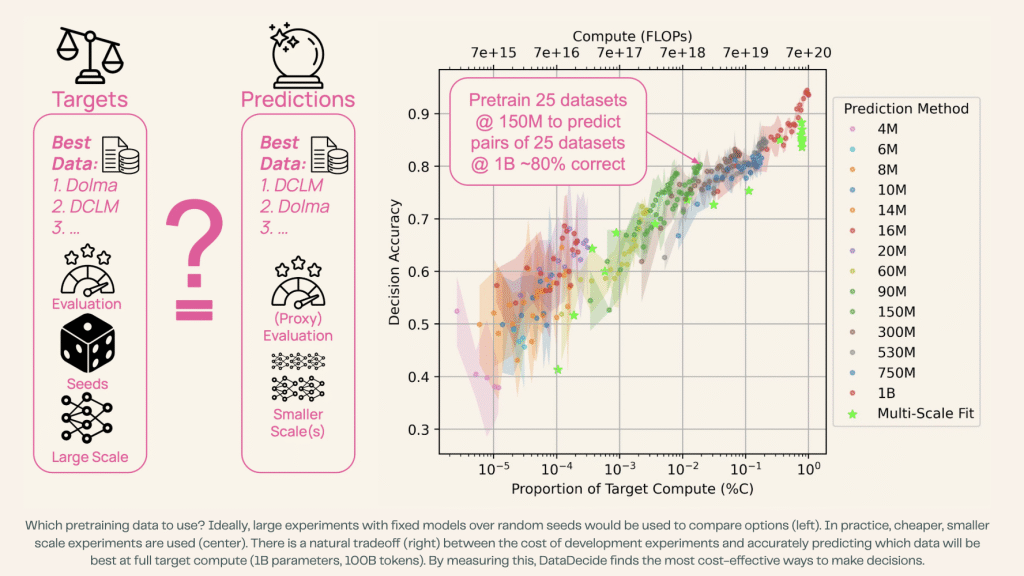
In the realm of large language model (LLM) development, the selection of appropriate training data plays a pivotal role in determining model performance. Researchers from the Allen Institute for AI (Ai2) have introduced an innovative benchmark suite called DataDecide, designed to shed light on the impact of pretraining data across an extensive range of 30,000 LLM checkpoints.
The Challenge of Data Selection in LLM Pretraining
The process of developing large language models involves a significant computational investment, particularly when exploring different pretraining corpora. Analyzing datasets on a large scale, involving billions of parameters and hundreds of billions of tokens, can be a resource-intensive task, often requiring hundreds of thousands of GPU hours for each run. Due to these constraints, researchers and practitioners often conduct experiments on smaller scales to manage computational costs effectively.
DataDecide: A Game-Changer in LLM Research
DataDecide provides a comprehensive framework for researchers to evaluate the impact of pretraining data on LLM performance across a vast array of 30,000 checkpoints. By leveraging this benchmark suite, researchers can gain valuable insights into how variations in training data influence the overall effectiveness and efficiency of large language models.
The Significance of DataDecide in Advancing LLM Research
Understanding the nuances of pretraining data selection is crucial for enhancing the performance and robustness of large language models. With Ai2’s DataDecide suite, researchers can conduct in-depth analyses to identify optimal pretraining datasets, refine model architectures, and ultimately unlock the full potential of LLM technology.
In conclusion, Ai2’s DataDecide benchmark suite represents a significant advancement in the field of large language model research. By enabling researchers to explore the impact of pretraining data across a diverse set of checkpoints, DataDecide empowers the development of more effective and efficient LLMs, paving the way for groundbreaking advancements in natural language processing.
References:
1. MarkTechPost. (2025, April 16). Model Performance Begins with Data: Researchers from Ai2 Release DataDecide—A Benchmark Suite to Understand Pretraining Data Impact Across 30K LLM Checkpoints. [https://www.marktechpost.com/2025/04/16/model-performance-begins-with-data-researchers-from-ai2-release-datadecide-a-benchmark-suite-to-understand-pretraining-data-impact-across-30k-llm-checkpoints/]